Stuck Waiting in the Trump Accounts App? Election Status Explained
Seeing “we’ll let you know when your account election is processed”? What Form 4547 + confirmed info means, push notifications, and what to do while you wait.
Seeing “We’ll let you know when your account election is processed”? That is normal. You finished IRS Form 4547 and confirmed your details. The app is waiting on the IRS to finish the election — not asking you to re-apply.
Key Takeaways
- Checkmarks for Form 4547 and confirmed info mean your part is done.
- “Election processed” = IRS finished the election — then activation / funding can move forward.
- Turn on push notifications so you do not miss the next step.
- Waiting does not mean something is broken. Use the time to plan contributions and check eligibility extras (like Dell $250).
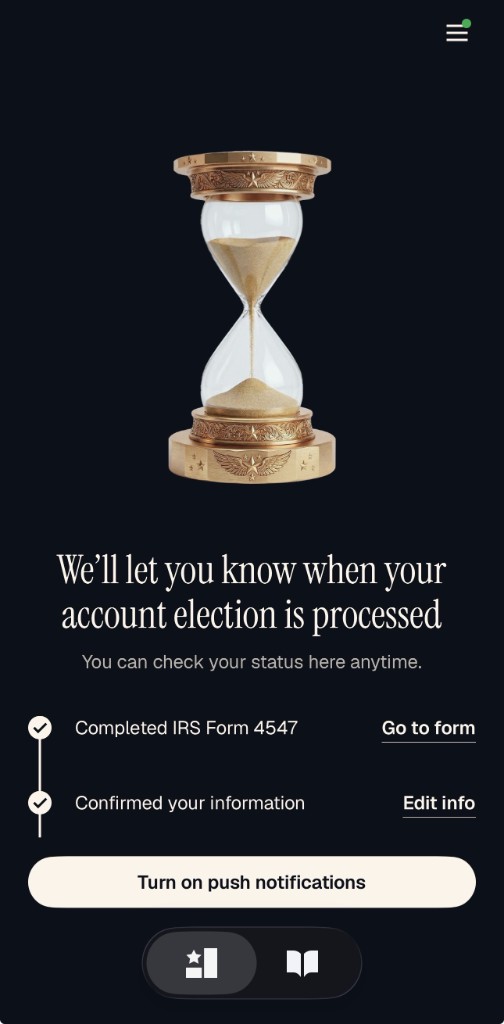
What that screen means
After you sign up in the official Trump Accounts app, many parents land on a dark status screen with a progress checklist. The headline says the app will notify you when your account election is processed. Below that, you can open the app anytime to check status.
An “election” is the IRS term for choosing to open a Trump Account under IRC Section 530A — usually by filing IRS Form 4547. The app mirrors that process so you can track what is done and what is still with the government.
ℹ️ This is not a rejection
A waiting screen after checkmarks is expected. It does not mean your Form 4547 failed. For deposit timing and IRS processing windows, see $1,000 grant / deposit status.
What each checkmark means
| App step | What it means | Your next move |
|---|---|---|
| Completed IRS Form 4547 | You filed (or linked) the Trump Account Election. | Keep a copy of the form / e-file acknowledgment. Form 4547 guide. |
| Confirmed your information | Names, contact details, and election info match what the app needs. | Use Edit info in the app if something is wrong. |
| Waiting: election processed | IRS / program processing is still in progress. | Turn on push notifications. Check the app periodically — do not refile unless told to. |
Should you turn on push notifications?
Yes — that is the primary CTA on the waiting screen for a reason. Processing can finish when you are not staring at the app. Notifications tell you sooner; they do not make the IRS move faster.
- Allow notifications for the official Trump Accounts app only (from trumpaccount.com / App Store / Play Store).
- Ignore third-party “Trump Account status” apps that ask for SSN or payment.
- You can still open the official app anytime — the subtext says you can check status there.
⚠️ Beware of fake status apps
Never share your child’s SSN with an unknown App Store listing. Stick to IRS.gov, trumpaccounts.gov, and the official Trump Accounts app. More on that: Is there a Trump Accounts app?
Where this sits in the full open path
- File IRS Form 4547 with your tax return, at trumpaccounts.gov, or by mail.
- Download the official app and create an account (email login).
- Confirm your information so it matches the election.
- Wait for election processing ← you are here on the hourglass screen.
- Activate with Robinhood (sole initial trustee at launch) when the app / program unlocks the next step.
- Contribute after accounts go live (around 2026-07-04 for the pilot window).
Full walkthrough: how to open a Trump Account and step-by-step blog guide.
What to do while you wait
You cannot rush the IRS clock. You can get ready for day one of funding:
- Confirm eligibility for every child you plan to cover.
- Run a growth projection so grandparents know what a monthly gift could become by age 18.
- Check Dell $250 ZIP eligibility if your child is under 10.
- Read Form 4547 common mistakes so you are not stuck fixing a typo later.
- Set a calendar reminder for the 2026-05 authentication window and 2026-07-04 go-live.
Try the Trump Account Calculator
Check seed eligibility and see how much a Trump Account could be worth at 18.
Still stuck after a long wait?
- Confirm Form 4547 was accepted (e-file acknowledgment or mailed return status).
- Open the official app → use Edit info if any detail is wrong.
- Compare timelines in our deposit status guide (e-file vs mail).
- Watch for IRS / Treasury mail or email about authentication (often starting 2026-05).
- If far past normal processing and nothing updates, contact the IRS with your Form 4547 copy ready — not a random “status checker” site.
✅ Educational only
This page explains what the official app UI is asking parents to do. It is not tax, legal, or financial advice. Verify current steps at trumpaccounts.gov and trumpaccount.com.
Frequently Asked Questions
What does “account election is processed” mean in the Trump Accounts app?
I completed Form 4547 and confirmed my info — why am I still waiting?
Should I turn on push notifications in the Trump Accounts app?
Can I edit my information after confirming it in the app?
When can I contribute money or get the $1,000 deposit?
Related Articles
Is There a Trump Accounts App? Portal, Mobile Access & Status (2026)
Activate via the Trump Accounts app after Form 4547. Robinhood is the sole initial trustee. Portal timeline, status checks, and how to manage on mobile.
SSN, Form 4547, and Account Activation
Get an SSN, file Form 4547, then activate the Trump Account in the official app. Full open steps are on the how-to-open guide.
IRS Form 4547: How to File for a Trump Account (2026)
IRS Form 4547 is the Trump Account election form. How to fill it out, e-file vs mail, April 15 deadline, and common mistakes — plain English.
Trump Account $1,000 Grant Application Status (2026)
Check the status of your Trump Account $1,000 deposit. Where is your money? How to track Form 4547, expected timelines, and what to do if it is delayed.
When Can I Open a Trump Account? Key Dates & Timeline (2026)
Trump Account timeline: file by April 15, authentication in May, $1,000 deposit July 4, first market investment July 6. 2M+ forms filed. Full timeline.
Does Robinhood Offer Trump Accounts? Yes
Yes — Robinhood is the sole initial trustee for Trump Accounts. How to file Form 4547, activate in the app, and start contributing.
Disclaimer: This is educational content, not tax or financial advice. Consult a qualified tax professional or financial advisor before making investment decisions.
Sources:
- trumpaccounts.gov
- trumpaccount.com (official app)
- IRS Notice 2025-68
- Robinhood — Trump Accounts Launch
- One Big Beautiful Bill Act (OBBBA), IRC Section 530A